EVERYTHING IS HERE!
HERE IS THE SYSTEM:
YOU HAVE 10 DAYS
TO APPLY ALL THESE:
*THEN, I'LL TEACH YOU
THE 'SNOWBALL EFFECT'!
< BOOKMARK THIS PAGE BEFORE YOU FORGET IT! >
*IMPORTANT NOTE*
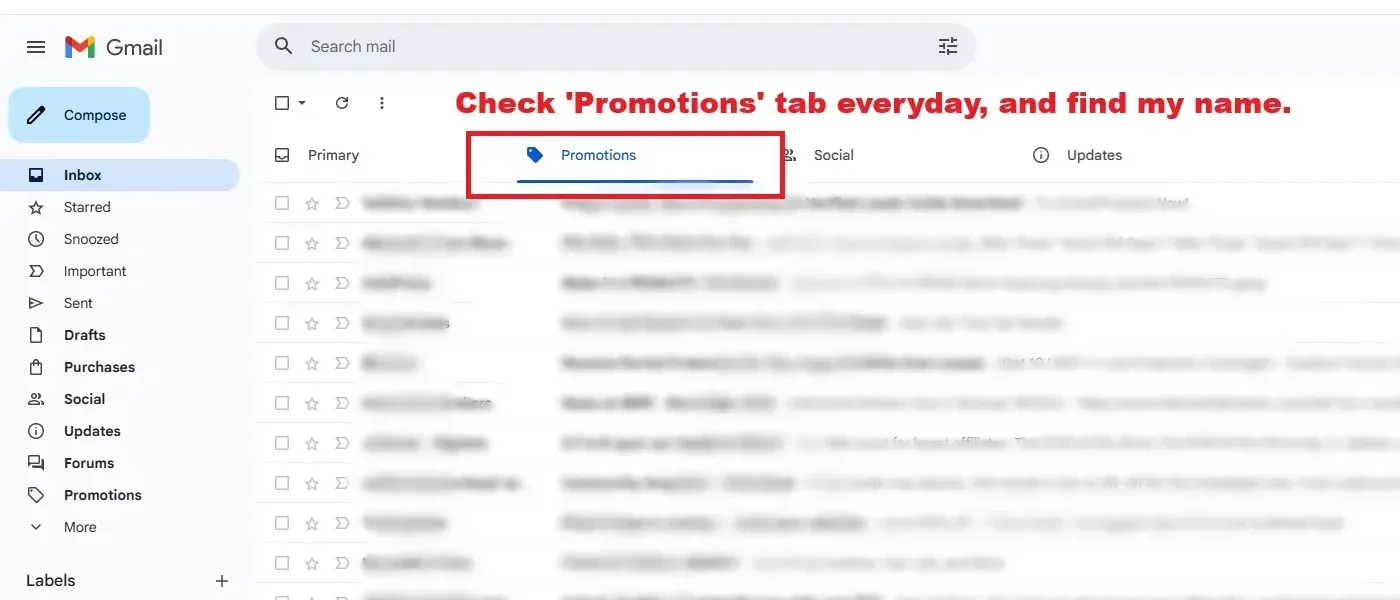
Check your 'Promotions tab'
on your e-mail browser, everyday.
Else, you may miss the lessons.
Check my name there:
"GOKHAN DONMEZ"
*Later, I'll also teach you the
'SNOWBALL EFFECT',
which is only done by 1% of the email marketers.
Before to continue, understand the picture below:
OK. Listen!
Do all these steps on your PC or laptop.
It's quite easy to do with the tutorials below.
Now, here is the plan:
1- We'll be collecting our prospects' email addresses, teach them how to fish, and make them hire the fishing rod! We'll teach them how to make money online, and make them use the same tools we are using.
2- To do that we'll use a special site: an autoresponder site. With it, we'll create a form page to collect their emails, and create prewritten messages to send them to our subscribers' email addresses. I'll give you my own messages in a minute.
3- I'll tell you what you will be promoting to make sales, and how to get your affiliate links.
4- I'll give you the email messages for you to copy and paste to the autoresponder a minute later. So that you'll be able to copy me perfectly.
5- I'll give you my traffic source, now.
6- The traffic source will send the traffic to your form page. The autoresponder form will collect your prospects' emails and send the pre-written messages everyday one by one, with your own affiliate links, and you'll begin to make your first sales online. With the power of THE SNOWBALL EFFECT, you'll be 'UNSTOPPABLE'.
7- It will get bigger and bigger.
>>> You need to do a few manual changes on the emails you will send. Those will include your own affiliate links and your own thank you page like this page you are looking at.
Now stick with me!
We'll use this autoresponder. It's free to begin and beginner friendly. Sign up with it:
>>> Click here and sign up with this autoresponder site.
First, sign up now. Then come back here and do the things one by one as I showed you in the videos below. You can open this page on another tab on your internet browser to continue reading.
>>> Click here and sign up with this autoresponder site.
1- First, be sure to login to systeme io with the red link above.
2- Then follow the steps in the video below to get your messages instantly.
3- The link you need to use is below the video.
Here is the link you need to copy and paste to your browser, after logging into systeme io.
https://systeme.io/dashboard/share?hash=66053232c19d5e5d7654cbecb7ffef298b280d9&type=funnel
First, be sure you have logged in to systeme io.
Then copy the link above and paste it to a blank tab on your browser and press 'Enter'.
The system will automatically upload the messages to your systeme io account.
*But before you go, you need to make a few changes on the messages. You need to add your own affiliate links to them.
IMPORTANT: By doing the things above, you'll be able to earn your own money by just using this funnel.
But later, I'll give you 'another funnel' for you to use for the snowball effect. (Snowball effect is very similar to viral effect on social media. We're talking about an unstoppable traffic increment for our form page. This is done by only 1% of the internet marketers.)
For now; you'll embed your affiliate links to the funnel like in the videos (below again), boost traffic with the traffic site below, make your first few sales in mostly around 1-3 months.
These sales will turn into a recurring income for you.
You'll be able to get my PDF report and sell it on any price you want later...
(By the way, my name is Gokhan. Search for this name on the promotions tab of your email browser everyday. I put a big picture at the top of this site to show you the place of the promotions tab.)
(My name: Gokhan DONMEZ)
Now, we' re getting to the crucial part...
About your affiliate links:
You'll see places to embed your own affiliate links in the messages you have just downloaded to your account.
*You'll be promoting the same tools you are using. I'll get back to it in a minute. We'll talk about it later in the email lessons.
What about the traffic?
You'll be using this site to drive traffic to your landing pages:
>>> CLICK HERE
Now:
1- Embed your name to the messages on the systeme.io like in the videos. Change my name into yours.
2- Embed your affiliate links to the messages. Make them clickable, like in the video. Then click 'Activate' for all of your messages, like in the video. Be careful for the lesson order. (First Lesson 1, then Lesson 2 etc...) .
3- Send traffic to your form page via the traffic source I've been using for a long time. The link is above of the previous videos.
4- You can get more traffic from that site later.
You need to change the links in your own TY page into your own affiliate links. Check the TY page explanation below:
Hey! What is a TY, 'Thank You' page?
When someone signs up to your email list through your form page, they will see your 'Thank You' page. Don't worry. It'll be adjusted because you have copied the link above to your browser and pressed 'Enter'. It happened automatically.
Check this TY page tutorial video to embed your links:
IMPORTANT:
Follow my email lessons: After the 10th day message, you'll see a section of an ebook about 'The Snowball Effect'. If you like, you may sell it for yourself by using your own Paypal buttons, by your own way. I'll show those too.
Never miss a lesson. I'll teach you all the system.
And the last thing you need to take care of (this is optional but may change your results greatly) is to buy a domain name and embed it to systeme io.
Why we do this? If we don't do so, the messages we will send may fall into our prospects' spam box, and our prospects may never see our messages. But with this operation, we'll be able to achieve 95%+ inbox rate instead of 70% or lower.
It's 10 minutes all you need. Let's get rid of this thing:
THE VIDEO IS BELOW. WATCH IT AND APPLY. YOU MAY PASS TO READ THE EXPLANATION BELOW IT, READ IT ONLY IF YOU FACE A PROBLEM.
A LITTLE EXPLANATION FOR THE VIDEOS:
1- First, we'll buy a domain name from Namecheap. (You may use another domain registrar other than Namecheap, the main adjustments are always the same.) (What's a domain name? For example: "www.google.com" is a domain name. You can use "www. ..... .com" as your own domain name, just fill the dots with whatever you want, that's your imagination. If it hasn't been taken by someone else of course.)
We' ll create an account on Namecheap, choose a domain name for you, and make the payment, around $11/year.
This is such a mere investment for the huge results we're after. But you may want to search more for a domain name provider that you may like better.
2- Then, we'll go to systeme io and add our domain name to the domain names section. Systeme io will give us some codes. We will copy those codes and paste it the appropriate place on Namecheap. (check the links and the video above). So, these two sites (Systeme io and Namecheap) will be able to see each other.
IMPORTANT: It may take one or two days for your domain name to be accepted. Feel free to contact with systeme io support team via email.
3- It's just a copy-paste work. First, check the video above, then follow the links if you need more support:
>>> https://help.systeme.io/article/135-how-to-connect-your-domain-to-systemeio
>>> https://help.systeme.io/article/4228-how-to-connect-your-namecheap-domain-to-systeme-io
IMPROTANT NOTE: I want to tell you about my little experience about this... My attempts were rejected 2 times. Then I contacted with the systeme io support team and realized that I needed to change a record starting with "si....". If you see a record like this, "DO NOT add your domain name" at the end of it just like in the examples the links above. I explained it in the video...
And ALWAYS feel free to contact with systeme io staff members.
THAT'S THE MOST OF IT, BUT YOU STILL NEED 'THE SNOWBALL EFFECT SYSTEM' TO MAKE IT A REAL MASTERPIECE!
Try to complete all these in 1 to 10 days. Only then you will be able to add the snowball effect to your system.
***Be sure to hit the publish button for all of your messages before to get traffic to your form page. Don't forget to test your system.
I've said you that in 2 weeks, YOUR WHOLE LIFE WILL BEGIN TO CHANGE. Just do it step by step. Start right now. Do not procrastinate: RUN FOR IT!
IMPORTANT NOTE:
Check your 'Promotions' tab on your email browser, everyday.
We'll dive much deeper later.
Name? My name is Gokhan Donmez. Search for this name on the promotions tab on your email browser everyday. Do not forget it.
ABOUT THE SNOWBALL EFFECT:
I'll also teach you the 'SNOWBALL EFFECT', which is only done by only 1% of the email marketers. I'll let you get it as a PDF file for completing a task! After around 10 days...
But if you want to acquire it right here and right now, click the link below. (I still suppose you to check your promotions tab on your email browser daily and wait for 10 days.)
If this is your first day, don't worry. Just stick to your online email lessons that I've created for your own success.
Do all these today. After 10 days, we'll talk about the snowball effect (just check your promotions tab everyday on your email browser). Till that day, make sure that everything is ready. That day, you'll understand that you are about to step on something really big.
Don't forget to bookmark this page on your web browser. You may want to come back later.
GOKHAN DONMEZ
There you have it:
NOW GO FOR IT !
TAKE CARE OF THE DETAILS,
I'LL SHOW YOU EVERYTHING !
THAT'S MY PROMISE!
Create Your Free Account